
New Instagram Shopping Features for Independent Artists
You just dropped a new t-shirt design and you're posting about it on Instagram. But to buy it, a fan has to tap your bio, find the right link, leave the app, and find their way around your store. That's a lot of clicks, and you lose people at every step. The goal should be to close that gap. With Instagram's shopping features, you can let fans buy your merch right from the post or Story where they discovered it.
Get Your Account Ready to Sell
Confirming Your Eligibility as a Creator or Business
Instagram has expanded its commerce eligibility, making it easier for independent artists to sell their own gear. You don't need to be a huge brand, but you do need to meet a few straightforward criteria.
First, your Instagram account must be a professional account, either Creator or Business. If you're still using a personal profile, you can switch it over in your settings. This gives you access to the tools you'll need for commerce.
You'll also need to follow Instagram's Merchant Agreement and Commerce Policies. This mostly means you're selling physical goods from a legitimate website that you own. This expansion is a big deal for musicians looking to sell directly to their fans, as reported by Music Business Worldwide.
Once your profile is set up, you connect your product catalog. If you use a platform like Shopify or Big Cartel for your merch, you’ll link that catalog directly to your Instagram account. For instance, with an approved Shopify store, you'd go to your Instagram settings, find 'Business,' then 'Shopping,' and follow the prompts. This syncs your inventory, descriptions, and images, getting them ready to be tagged in your posts.
Let Fans Buy Straight from Your Posts and Reels
Mastering Product Tags in Posts, Reels, and Stories
The real advantage of Instagram Shopping is how it integrates directly into your content. You can tag your merch in posts, Reels, and Stories, turning a casual scroll into a purchase. This completely bypasses the need for fans to leave the app to buy something.
When a fan taps a product tag, they can see the item's details and price. For many businesses in the US, fans can even complete the purchase right there in the app. Every extra click is a chance for a fan to get distracted and leave, so removing those steps is a big improvement for your direct-to-fan sales.
You have to weave these tags into your content naturally. Don't make every post a hard sell. Instead, fit your products into your regular artist story. Imagine you just got a box of your new limited-edition vinyl. You could film an unboxing Reel, showing off the artwork and colored wax. As you talk about the music, you can tag that vinyl directly in the Reel so fans can tap and buy it without missing a beat. You can find more detailed steps on using these features in guides like this one from Push.fm.
Tunepact tip: A music-first link-in-bio page for your releases, socials and shows. Create your bio link →
Showcase Your Merch with Better Visuals
Showcasing Your Products with Engaging Visuals
Not all merch works equally well on Instagram. Limited edition vinyl, unique apparel, and exclusive bundles tend to do very well. Think about items that feel special and connect to your artist brand, not just generic products.
Your product photos and videos need to be good. Instagram is a visual platform, so blurry, poorly lit images won't work. You're selling an extension of your art, so treat it that way. Invest time in clear, appealing visuals that show your merch in its best light.
Instead of a flat photo of your new t-shirt, show someone—maybe you, maybe a fan—wearing it at a show, looking genuinely excited. This doesn't just display the shirt; it sells the experience and the connection to your music. Just make sure the product is clearly visible and the photo feels authentic. This is all part of having a solid strategic music merchandise plan.
How to Get More People to See Your Shop

Getting the Most from Instagram's Built-in Features
Having a shop is one thing; getting fans to visit is another. Use Stories, Reels, and Live sessions to announce new merch drops. You can create countdown stickers for a release, do a Q&A while wearing your latest hoodie, or tease new designs in your Stories.
To kick off a new merch line, you could run a contest. Tell fans to visit your Instagram Shop, find a specific item, and comment on your post with their favorite detail about it. This drives traffic directly to your shop and creates engagement around your products, which helps with visibility.
Instagram Ads can also be a powerful way to reach your existing followers and new potential fans. You can run ads that specifically drive traffic to your Instagram Shop. And understanding the Instagram algorithm is always helpful. Consistently creating good content and engaging with your audience will naturally help your shop get seen more often.
Connect Your Instagram Shop to Your Main Bio Link
How Tunepact's Smart Bio Link Enhances Your Selling Strategy
Even with direct shopping on Instagram, it's smart to have a central hub for everything you do. Your Tunepact Smart Bio Link is a music-first link-in-bio page for your releases, socials, and shows. It’s the one place fans can find everything from your latest single to your tour dates.
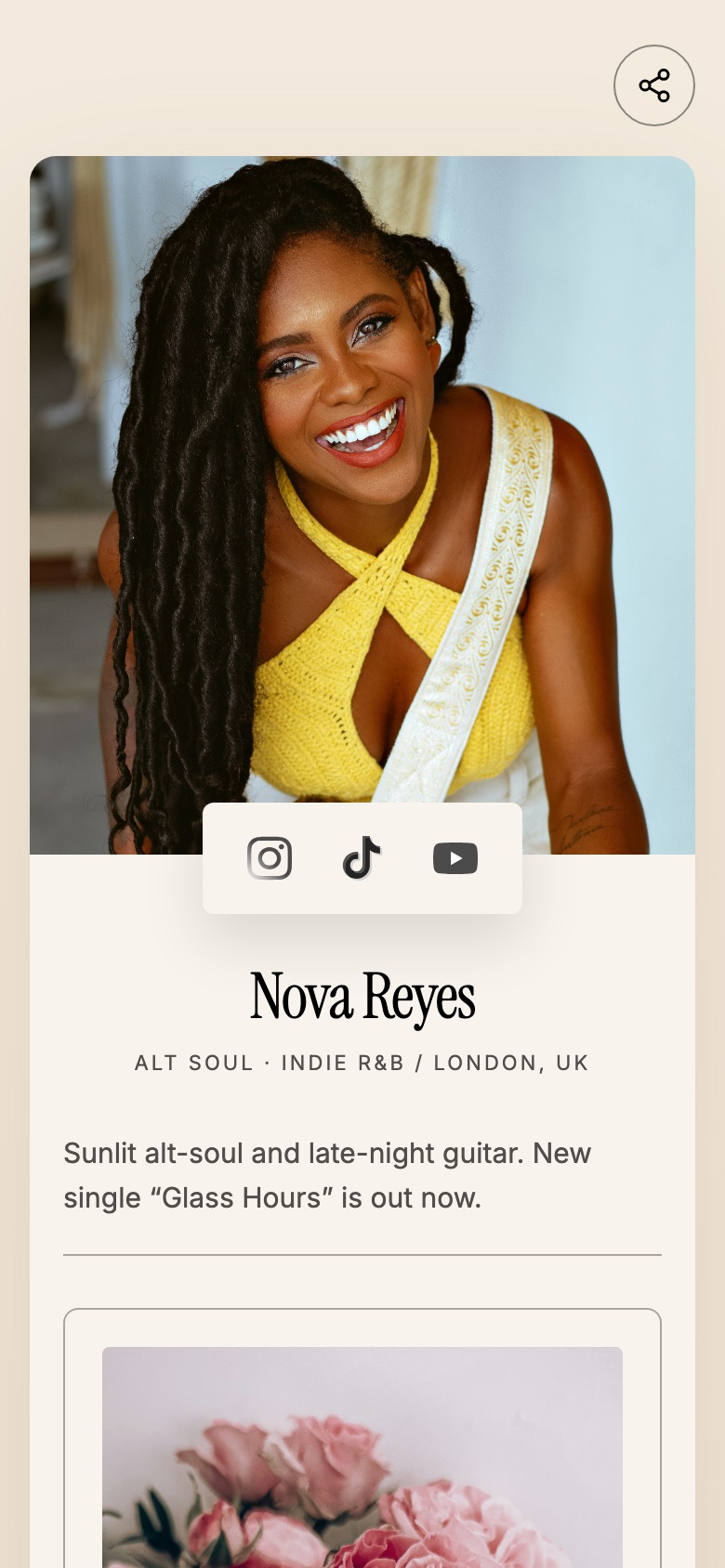
Think of your Smart Bio Link as your digital home base. Even with Instagram's shopping tools, you'll still want one place where fans can find your full discography, concert tickets, and mailing list. This consolidates all your important links, making it easy for fans no matter where they find you.
On your Smart Bio Link, you can create a dedicated section called 'Merch.' In that section, add a direct link to your Instagram Shop (for example, instagram.com/yourartistname/shop). This way, even if a fan is looking for tour dates, they'll see your merch prominently displayed and can click straight through. This approach helps you catch fans on other platforms, as discussed in articles like Cyber PR Music's shop talk.
Common Mistakes to Avoid with Your Instagram Shop
Even with great tools, it's easy to make mistakes. A common one is using poor product images or having an unclear call to action. If your photos are low quality or it isn't obvious how to buy, fans will just scroll past.
Another error is inconsistent branding. Your merch should feel like a natural part of your artist identity. If your shop looks generic or disconnected from your music, it can feel untrustworthy. Keep a consistent visual style and voice across your product posts.
For example, don't just snap a quick, blurry photo of your new hoodie on your bed and post it without a clear description or price. Instead, use well-lit, high-resolution images, provide all the key details like sizes and materials, and make the call to action ('Shop now on Instagram!') unmistakable. Clarity builds trust.
Finally, remember that selling merch involves customer service. Be ready to answer questions about sizes, shipping, and returns. And don't forget to track your sales data. It helps you understand what's selling, what isn't, and how to adjust your plans.
Frequently Asked Questions about Instagram Shopping for Artists
How do I qualify for Instagram Shopping as an independent musician?
To qualify, you need a professional Instagram account (Creator or Business) and must comply with Instagram's Merchant Agreement and Commerce Policies. You also need to sell physical goods from an eligible website you own, which then links to your Instagram product catalog.
Can I sell digital music directly through Instagram Shopping, or is it just for physical merch?
Instagram Shopping is primarily designed for physical goods. While you can tag products that link to external sites selling digital music, direct in-app checkout is typically for physical merchandise. You can find more details on what's eligible in guides like this one about Instagram Shopping features for music sales.
What's the best way to promote my Instagram Shop to my existing fanbase?
Regularly feature your products in your Stories, Reels, and Live videos, using product tags. Announce new drops with exciting visuals, run contests that direct fans to your shop, and use your Smart Bio Link to create a dedicated section for your merch.
How does Instagram Shopping handle payments and shipping for artists?
For businesses with in-app checkout (currently mostly in the US), Instagram processes payments directly. For others, the purchase is completed on your connected website (e.g., Shopify). Shipping is handled by your chosen e-commerce platform or directly by you, just as it would be for sales from your own website.