

How Indie Artists Use Spotify Collaborative Playlists
You’re looking at your Spotify for Artists numbers, and it feels like you’re shouting into the void. You post on social media, you submit to playlists, but it’s all one-way traffic. You're pushing your music out, but you're not getting much back besides a few streams. There’s a simple tool inside Spotify that can change this: the collaborative playlist. Most artists either ignore it or just use it with their bandmates. But if you open it up to your fans, you can turn listeners into your best promoters and build a real community around your music as part of a smart Spotify streaming strategy.
How to set up your collaborative playlist
Creating a collaborative playlist is simple, but a few small choices at the start will make a big difference in how well it works for you and your fans.
Create the playlist and make it collaborative
First, you need a playlist. You can use one you already have or start from scratch. To make a new one, open Spotify, go to "Your Library," and click "Create Playlist." Give it a name that feels like an invitation, something like "Our Band's Community Jams" or "Fan-Curated Road Trip." Once you have the playlist, right-click it (or tap the three dots on mobile) and select "Collaborative Playlist." A small icon will appear next to the name, showing it’s open for others to add songs. You can read more about the steps in the official Spotify Guide to Collaborative Playlists.
How to invite your fans
Now that your playlist is ready, you need to invite people. Right-click the playlist again, choose "Share," and then "Copy link to playlist." This is the link you'll give to your fans. A common mistake is just dropping this link on social media without any explanation. Instead, write a clear invitation. Tell people what it’s for and what kind of music you want them to add. Try something like, "I've started a new collaborative playlist called 'Late Night Drives.' Add one song you're loving right now that fits that vibe. And yes, you can add one of my tracks if it fits! Let's build this together." This clarity helps keep the playlist focused.
Ways to use the playlist to promote your music
A collaborative playlist isn’t just for sharing songs. It’s a way to get your audience involved, turning them from passive listeners into active participants. This can become a core part of your music marketing platform.
Start with your closest fans
Begin with the people who are already your biggest supporters. You can use the playlist as a kind of community mixtape. Ask them to add songs that inspire them or tracks they've recently discovered. Then, encourage them to add one of your tracks that fits the mood. This gets your music shared in a way that feels natural and fan-driven. For example, if you're about to release a new single, you could create a playlist called "The Road to [Your New Single Name]" and invite your super-fans to add songs that match the feeling of your upcoming release. This builds excitement and gives them a stake in your new music.
Turn curation into a regular event
You can take this a step further by making it a regular thing. Try running a monthly theme, like "Songs for a Rainy Day" or "Backyard BBQ Jams." Ask your community to add their picks to the playlist, and then feature the best additions on your social media, tagging the people who added them. When you do this, you're showing your fans that you value their taste, which makes them feel more connected to you and your music. You can even use this to get feedback on unreleased demos. Share a private link to a demo with a few trusted fans and ask them to add other songs that feel similar. It’s a low-pressure way to get valuable input.
Work with other artists
Collaborative playlists are also great for connecting with other independent artists. Find a few artists in your genre whose music you like and suggest a "Friends of [Your Artist Name]" playlist. Each of you can add a few of your own tracks, plus songs from other artists you admire. Then, you all share the playlist with your audiences. It's a simple way to cross-promote and introduce your music to new listeners who are likely to enjoy it. This is a natural extension of the benefits of music collaboration for independent artists.
Help new listeners find you through your fans
The real discovery potential of these playlists kicks in when your community becomes your unofficial promotion team. It’s a subtle but effective strategy to boost music playlist promotion.
Encourage your fans to share the playlist
When someone adds a song to your collaborative playlist, they feel a sense of ownership. Encourage them to share it with their friends. You can give them a simple prompt: "Thanks for adding that great track, [Fan Name]! Share the playlist with your friends so they can add their favorites too." This pushes your reach beyond your own network. And because the recommendation is coming from a friend, it feels more genuine than an ad. It's not you pushing your music; it's someone in their circle sharing a cool playlist that just happens to feature your songs.
What you can learn from the songs people add
While Spotify doesn't give you deep analytics for collaborative playlists, you can still learn a lot. Pay attention to which songs your fans add most often, or which of your own tracks they choose. This gives you real clues about your audience's taste and what they connect with in your music. You'll start to notice trends in genres, moods, or other artists your community loves. This can help inform the music you make and how you talk about it. You can find more detail on this in guides like the one from Viberate on Spotify collaborative playlists and analytics.
Put your playlist where everyone can find it
Once your collaborative playlist is active, you need an easy way for people to find it. Tunepact's Smart Bio Link is a music-first link-in-bio page built for your releases, socials, and shows.
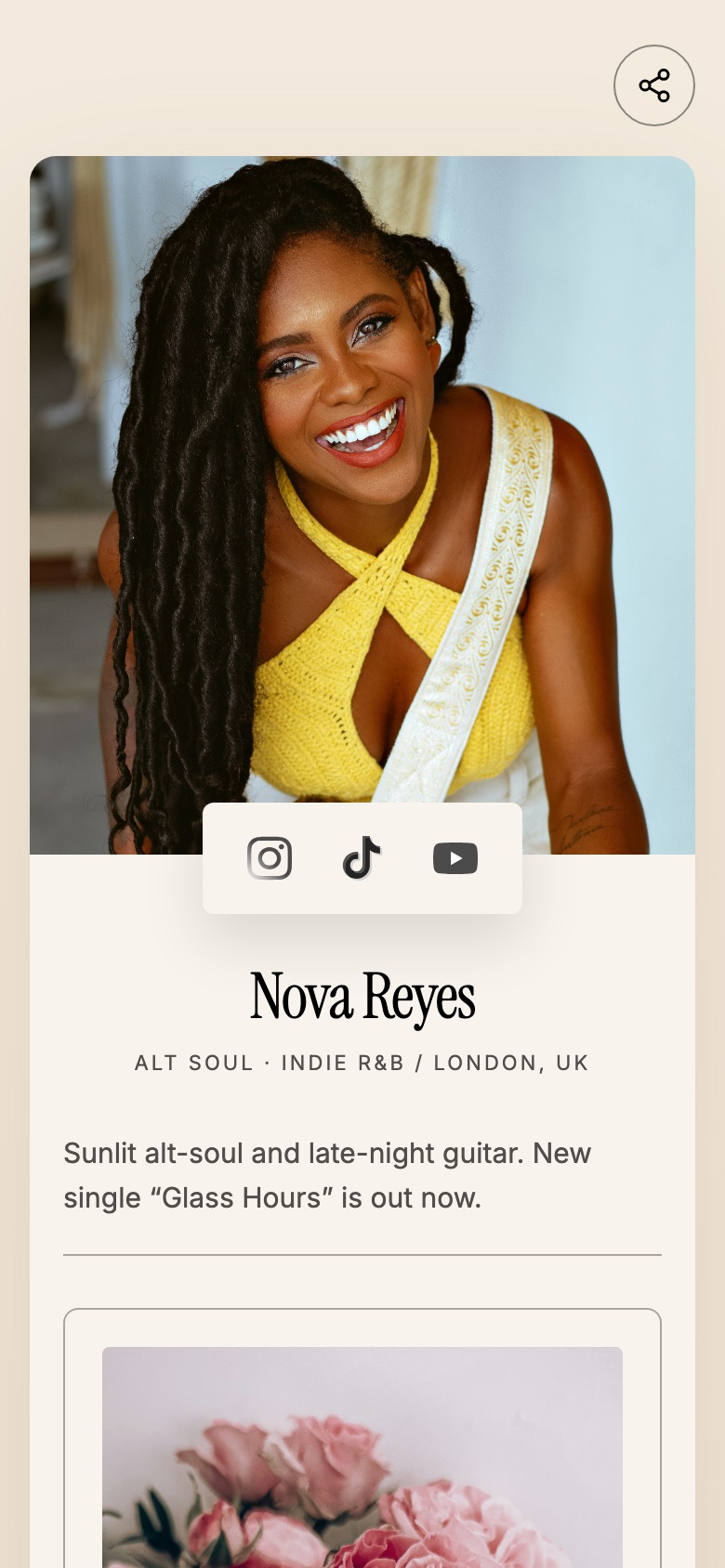
You can add the direct link to your Spotify collaborative playlist right on your Smart Bio Link page. This gives you one central place for all your important music links. Instead of changing the link in your social media bios all the time, you just update your Smart Bio Link once. This makes it simple for fans to find and contribute to your community playlists from any of your social media profiles.
You can customize your page to feature your fan-curated playlist with its own button, making it effortless for your audience to get involved.
How to keep your playlist healthy

A good collaborative playlist needs some attention. It’s not something you can just set up and forget about.
Set clear rules from the start
The most common problem is a lack of direction. Without any guidelines, your playlist can become a random mix of songs that don't fit together. When you invite people, be clear about what you're trying to build: "This playlist is for chill indie folk" or "We're building a playlist of high-energy punk." You can even add a rule in the playlist description, like "Please add only one song per day" or "Keep it to indie rock." This isn't about being strict; it's about maintaining quality.
You're still the editor
Even with guidelines, you might get some odd additions. Spotify shows you who added which track, so you can see what's going on. You have full control to remove any song that doesn't fit the vibe. Check in on the playlist every few days, especially at the beginning. You have to curate it. Your taste is what brought people here in the first place, so don't be afraid to remove songs that are off-topic.
Keep the playlist active
A collaborative playlist can lose energy if it's ignored. Promote it regularly on your social media. Share screenshots of new additions and tag the contributors. You could run a mini-contest or challenge your community to find the perfect song for a specific mood. Remember to add your own new releases or favorite tracks from time to time. This shows you're still involved and keeps your music in the mix. The goal is a long-term tool for fan engagement, not a one-time promotion.
Frequently Asked Questions About Collaborative Playlists
Can anyone add songs to my Spotify collaborative playlist?
Yes, anyone who has the direct link to your collaborative playlist can add songs to it. You control who receives that link, so it's important to share it wisely with your community and trusted contacts. Spotify does not publish collaborative playlists to your public profile, so it remains a private link you share.
How do independent artists promote a collaborative playlist to get more fan engagement?
Independent artists promote collaborative playlists by clearly communicating the playlist's theme and inviting fans to contribute. Share the link across your social media, email list, and community groups, encouraging fans to add songs and then share the playlist with their own networks. Engaging with contributors by highlighting their additions and running themed challenges also boosts participation.
What are the main benefits of using a collaborative playlist for an indie artist's music marketing strategy?
The main benefits include increased fan engagement by making listeners active participants, organic music discovery as contributors share the playlist with their friends, and valuable insights into your audience's taste. It also opens up unique cross-promotion opportunities with other artists and helps build a stronger community around your music.
How can I prevent spam or unwanted songs from being added to my collaborative Spotify playlist?
To prevent spam, set clear guidelines for contributions in the playlist description or when you share the link. Regularly monitor the playlist and remove any songs that don't fit the theme or are inappropriate. Spotify shows which user added each track, allowing you to easily identify and manage contributions.