Give Fans One Link for All Your Music
Bring your songs, streaming links, social profiles and artist information together on one Tune.page.
Free to create · One link everywhere · Yours to keep
Tune.page
One Link for All Your Music
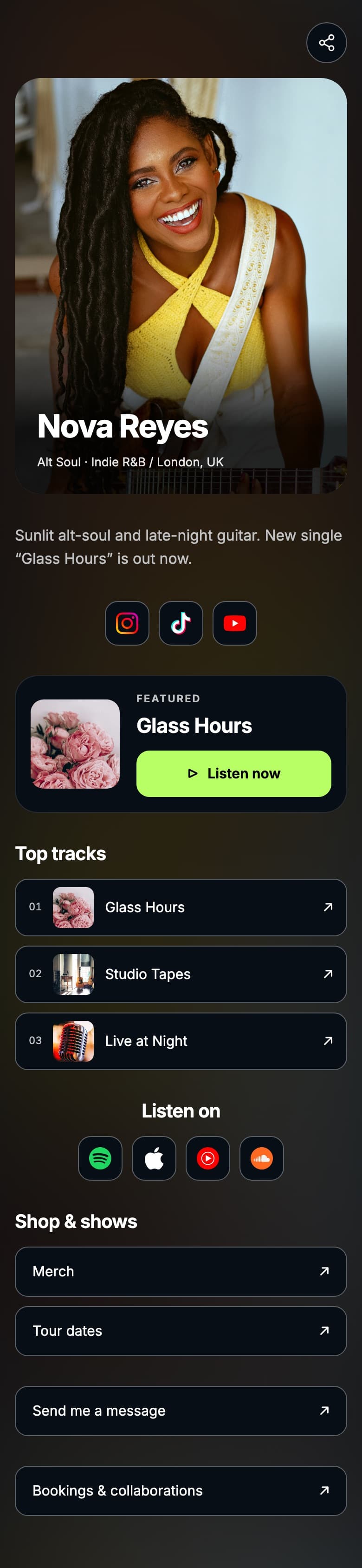
You have one bio link and your music is on six platforms. Sending listeners to a single service loses everyone who uses a different one, and sending them to a link tree of bare URLs loses the ones who cannot tell which link is the song. A music page solves both by putting the music, the platforms and who you are in one place.
What goes on a Tune.page
Illustrative. Add the sections that apply to you — nothing is mandatory.
- Artist profile
- Photo, name and a short line about who you are
- Featured song
- The one track you want a first-time visitor to hear
- Spotify
- Direct link to your artist profile or release
- Apple Music
- Direct link for listeners on Apple
- YouTube
- Videos and official audio
- SoundCloud
- Demos, remixes and unreleased work
- Social links
- Instagram, TikTok and anywhere else you post
- Fan signup
- Optional email capture that feeds your Fan Hub
- Contact option
- A route for bookings and enquiries
How it works
Create your page
Start a Tune.page in your Tunepact account and add your artist profile.
Add your music and platforms
Feature a song, then add Spotify, Apple Music, YouTube, SoundCloud and your socials.
Publish and use it everywhere
Put the one link in every bio you have, and check visitor and click activity as it comes in.
Why use one link instead of linking straight to Spotify?
Because you do not know which platform any given listener uses, and the ones who use a different one simply leave. A single page lets everyone choose, keeps the traffic somewhere you can measure, and gives you room to be an artist rather than a list of URLs.
- Listeners land on their own platform instead of bouncing off the wrong one.
- One link means one thing to update when a release goes live.
- Click activity tells you where your audience actually listens.
- A featured song gives first-time visitors an obvious place to start.
Part of Tunepact
Tune.page
Tune.page is Tunepact's hosted artist page. Beyond the link list it can host public song pages, collect fan signups into Fan Hub, and report visitor and click activity, so the link in your bio is a page you own rather than a redirect you rent.
- One shareable link for every platform
- Featured song and artist profile
- Optional fan signup feeding Fan Hub
- Visitor and click activity for your page
Related Tunepact tools
FAQ
Quick answers to common questions
No. Tune.page links to music that is already live on the platforms you add. It does not create pre-save campaigns, and this page does not claim to.
It is built around music rather than links in general: a featured song, public song pages, fan signup that feeds a fan database, and click activity by platform. A general link tool gives you a list of buttons.
Your page is hosted at a Tune.page address. What matters practically is that it is one stable link you can put everywhere and update without changing the URL.
The track that best represents you right now, which is not always the newest. First-time visitors usually play one song and decide from it.
Add the ones you actually maintain. A page with four working links beats one with nine, two of which point at abandoned profiles.
Yes, fan signup is optional and feeds into Fan Hub. That is the difference between traffic you rent from a platform and an audience you can reach again.
What this does and does not do
- Tune.page hosts and links to your music. It does not distribute music to streaming services.
- Links point to the platforms you add. Tunepact is not a pre-save service and does not create pre-save campaigns.
- Visitor and click activity is reported for your own page only.
- Adding a platform link requires that your music is already live there. Tunepact does not upload or distribute your music.
One link, every platform, one page you own
Create your Tune.page and put a single link in every bio you have.
Create My Music Page